
71 lines
2.8 KiB
Markdown
71 lines
2.8 KiB
Markdown
[](https://docs.microsoft.com/en-us/powershell/)
|
|
|
|
# PSGUIFunctions
|
|
A small collection of cobbled together Powershell functions for GUI messages and user input.
|
|
|
|
## Purpose and Background
|
|
I just needed a simple and easy way to display information, warnings, get input, select a file or directory, or ask a simple response question in a GUI format for my Powershell scripts. Sure there are many great modules I could use that are much more sophisticated, but I just found it fun to make my own and only needed some basic options. That's why I pieced together PSGUIFunction's examples for input and dialog boxes. Hopefully, you can get some use from them too.
|
|
|
|
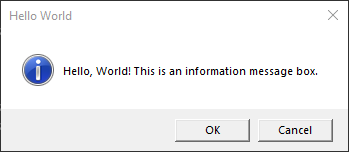
**The message boxes available are:**
|
|
* Information
|
|
* Warning
|
|
* Error
|
|
* Question
|
|
* Yes/No
|
|
* Ok/Cancel
|
|
* Retry/Cancel
|
|
* Abort/Retry/Ignore
|
|
|
|
**The input boxes available are:**
|
|
* String/Integer Input Box (returns a string or integer if entered)
|
|
* Listbox Input (returns the selection(s) from a given array)
|
|
|
|
**The dialog boxes available are:**
|
|
* Select Filename (returns full path to file selected)
|
|
* Save As Filename (returns full path to file and name for saving)
|
|
* Select Directory (returns full path to directory selected)
|
|
|
|
|
|
|
|
## Requirements
|
|
* [ ] Windows Powershell 5.1 and/or Powershell Core 7
|
|
|
|
Tested with Windows 11 x64 Version 23H2
|
|
|
|
## Installation
|
|
No install required. Just copy and paste the examples from within the PSGUIFunctions.ps1 file directly into your own script and modify as needed.
|
|
|
|
Downloading PSGUIFunctions.ps1 using [cURL](https://curl.haxx.se/):
|
|
|
|
```
|
|
curl -o PSGUIFunctions.ps1 https://tildeforge.dev/mlot/PSGUIFunctions/raw/branch/main/PSGUIFunctions.ps1
|
|
```
|
|
|
|
## Example Use
|
|
|
|
Copy and paste the function examples from within the PSGUIFunctions.ps1 file directly into your own script and call the function passing the required or optional arguments:
|
|
```powershell
|
|
function Select-Folder {
|
|
<#
|
|
.SYNOPSIS
|
|
Opens a folder selection dialog and returns full path to the folder.
|
|
|
|
.EXAMPLE
|
|
$selectedFolder = Select-Folder
|
|
#>
|
|
Add-Type -AssemblyName System.Windows.Forms
|
|
$FolderSelect = New-Object System.Windows.Forms.FolderBrowserDialog
|
|
$null = $FolderSelect.ShowDialog()
|
|
$SelectedFolder = $FolderSelect.SelectedPath
|
|
return $SelectedFolder
|
|
}
|
|
|
|
$selectedFolder = Select-Folder # Returns the full path to the selected folder assigning it to the $selectedFolder variable
|
|
```
|
|
|
|
## Contributing
|
|
If you want to contribute new functions or improve the exisiting ones, feel free to clone the repo and submit a pull request. And thanks for any time and help!
|
|
|
|
## License
|
|
[MIT License](https://opensource.org/licenses/MIT) for PSGUIFunctions
|