<?xml version="1.0" encoding="utf-8" ?>
<html xmlns="
http://www.w3.org/1999/xhtml" xml:lang="en" lang="en">
<head>
<style type="text/css">
/*
:Author: David Goodger (
goodger@python.org)
:Id: $Id: html4css1.css 8954 2022-01-20 10:10:25Z milde $
:Copyright: This stylesheet has been placed in the public domain.
Default cascading style sheet for the HTML output of Docutils.
See
https://docutils.sourceforge.io/docs/howto/html-stylesheets.html for how to
customize this style sheet.
*/
/* used to remove borders from tables and images */
.borderless, table.borderless td, table.borderless th {
border: 0 }
table.borderless td, table.borderless th {
/* Override padding for "table.docutils td" with "! important".
The right padding separates the table cells. */
padding: 0 0.5em 0 0 ! important }
.first {
/* Override more specific margin styles with "! important". */
margin-top: 0 ! important }
.last, .with-subtitle {
margin-bottom: 0 ! important }
.hidden {
display: none }
.subscript {
vertical-align: sub;
font-size: smaller }
.superscript {
vertical-align: super;
font-size: smaller }
a.toc-backref {
text-decoration: none ;
color: black }
blockquote.epigraph {
margin: 2em 5em ; }
dl.docutils dd {
margin-bottom: 0.5em }
object[type="image/svg+xml"], object[type="application/x-shockwave-flash"] {
overflow: hidden;
}
/* Uncomment (and remove this text!) to get bold-faced definition list terms
dl.docutils dt {
font-weight: bold }
*/
div.abstract {
margin: 2em 5em }
div.abstract p.topic-title {
font-weight: bold ;
text-align: center }
div.admonition, div.attention, div.caution, div.danger, div.error,
div.hint, div.important, div.note, div.tip, div.warning {
margin: 2em ;
border: medium outset ;
padding: 1em }
div.admonition p.admonition-title, div.hint p.admonition-title,
div.important p.admonition-title, div.note p.admonition-title,
div.tip p.admonition-title {
font-weight: bold ;
font-family: sans-serif }
div.attention p.admonition-title, div.caution p.admonition-title,
div.danger p.admonition-title, div.error p.admonition-title,
div.warning p.admonition-title, .code .error {
color: red ;
font-weight: bold ;
font-family: sans-serif }
/* Uncomment (and remove this text!) to get reduced vertical space in
compound paragraphs.
div.compound .compound-first, div.compound .compound-middle {
margin-bottom: 0.5em }
div.compound .compound-last, div.compound .compound-middle {
margin-top: 0.5em }
*/
div.dedication {
margin: 2em 5em ;
text-align: center ;
font-style: italic }
div.dedication p.topic-title {
font-weight: bold ;
font-style: normal }
div.figure {
margin-left: 2em ;
margin-right: 2em }
div.footer, div.header {
clear: both;
font-size: smaller }
div.line-block {
display: block ;
margin-top: 1em ;
margin-bottom: 1em }
div.line-block div.line-block {
margin-top: 0 ;
margin-bottom: 0 ;
margin-left: 1.5em }
div.sidebar {
margin: 0 0 0.5em 1em ;
border: medium outset ;
padding: 1em ;
background-color: #ffffee ;
width: 40% ;
float: right ;
clear: right }
div.sidebar p.rubric {
font-family: sans-serif ;
font-size: medium }
div.system-messages {
margin: 5em }
div.system-messages h1 {
color: red }
div.system-message {
border: medium outset ;
padding: 1em }
div.system-message p.system-message-title {
color: red ;
font-weight: bold }
div.topic {
margin: 2em }
h1.section-subtitle, h2.section-subtitle, h3.section-subtitle,
h4.section-subtitle, h5.section-subtitle, h6.section-subtitle {
margin-top: 0.4em }
h1.title {
text-align: center }
h2.subtitle {
text-align: center }
hr.docutils {
width: 75% }
img.align-left, .figure.align-left, object.align-left, table.align-left {
clear: left ;
float: left ;
margin-right: 1em }
img.align-right, .figure.align-right, object.align-right, table.align-right {
clear: right ;
float: right ;
margin-left: 1em }
img.align-center, .figure.align-center, object.align-center {
display: block;
margin-left: auto;
margin-right: auto;
}
table.align-center {
margin-left: auto;
margin-right: auto;
}
.align-left {
text-align: left }
.align-center {
clear: both ;
text-align: center }
.align-right {
text-align: right }
/* reset inner alignment in figures */
div.align-right {
text-align: inherit }
/* div.align-center * { */
/* text-align: left } */
.align-top {
vertical-align: top }
.align-middle {
vertical-align: middle }
.align-bottom {
vertical-align: bottom }
ol.simple, ul.simple {
margin-bottom: 1em }
ol.arabic {
list-style: decimal }
ol.loweralpha {
list-style: lower-alpha }
ol.upperalpha {
list-style: upper-alpha }
ol.lowerroman {
list-style: lower-roman }
ol.upperroman {
list-style: upper-roman }
p.attribution {
text-align: right ;
margin-left: 50% }
p.caption {
font-style: italic }
p.credits {
font-style: italic ;
font-size: smaller }
p.label {
white-space: nowrap }
p.rubric {
font-weight: bold ;
font-size: larger ;
color: maroon ;
text-align: center }
p.sidebar-title {
font-family: sans-serif ;
font-weight: bold ;
font-size: larger }
p.sidebar-subtitle {
font-family: sans-serif ;
font-weight: bold }
p.topic-title {
font-weight: bold }
pre.address {
margin-bottom: 0 ;
margin-top: 0 ;
font: inherit }
pre.literal-block, pre.doctest-block, pre.math, pre.code {
margin-left: 2em ;
margin-right: 2em }
pre.code .ln { color: grey; } /* line numbers */
pre.code, code { background-color: #eeeeee }
pre.code .comment, code .comment { color: #5C6576 }
pre.code .keyword, code .keyword { color: #3B0D06; font-weight: bold }
pre.code .literal.string, code .literal.string { color: #0C5404 }
pre.code .name.builtin, code .name.builtin { color: #352B84 }
pre.code .deleted, code .deleted { background-color: #DEB0A1}
pre.code .inserted, code .inserted { background-color: #A3D289}
span.classifier {
font-family: sans-serif ;
font-style: oblique }
span.classifier-delimiter {
font-family: sans-serif ;
font-weight: bold }
span.interpreted {
font-family: sans-serif }
span.option {
white-space: nowrap }
span.pre {
white-space: pre }
span.problematic {
color: red }
span.section-subtitle {
/* font-size relative to parent (h1..h6 element) */
font-size: 80% }
table.citation {
border-left: solid 1px gray;
margin-left: 1px }
table.docinfo {
margin: 2em 4em }
table.docutils {
margin-top: 0.5em ;
margin-bottom: 0.5em }
table.footnote {
border-left: solid 1px black;
margin-left: 1px }
table.docutils td, table.docutils th,
table.docinfo td, table.docinfo th {
padding-left: 0.5em ;
padding-right: 0.5em ;
vertical-align: top }
table.docutils th.field-name, table.docinfo th.docinfo-name {
font-weight: bold ;
text-align: left ;
white-space: nowrap ;
padding-left: 0 }
/* "booktabs" style (no vertical lines) */
table.docutils.booktabs {
border: 0px;
border-top: 2px solid;
border-bottom: 2px solid;
border-collapse: collapse;
}
table.docutils.booktabs * {
border: 0px;
}
table.docutils.booktabs th {
border-bottom: thin solid;
text-align: left;
}
h1 tt.docutils, h2 tt.docutils, h3 tt.docutils,
h4 tt.docutils, h5 tt.docutils, h6 tt.docutils {
font-size: 100% }
ul.auto-toc {
list-style-type: none }
</style>
</head>
Building Perl modules on Windows
Note
These instructions are untested, and kept here for reference only. If you have the knowledge to update this page, patches are welcome!
CPAN
Setup
You must paste my script to directory above your Perl installation. Script was written for Perl installed in MozillaBuild directory: C:\mozilla-build\perl-5.18\x64 or \x86, so script must be in perl-5.18 dir, if your Perl installation dir is in another place you must edit PATHs in lines 13 & 16.
MSYS can be extracted to any directory you want, you just need to edit PATH in SET MSYS=I:\MSYS\bin, fg. SET MSYS=C:\MSYS\bin
Usage
To use script you must open cmd (Win+R, type cmd), navigate to directory where you pasted cpan.bat. Type cpan.bat x86 if you're using 32bit Hexchat & Perl or cpan.bat x64 for 64bit version. After that you can use all cpan commands.
Old depreciated method
Software
To start building Perl modules you need to download and install this software (in their default install paths):
Downloading and Extracting
Start MozillaBuild console (it's in C:\mozilla-build) start-msvc11.bat (if you're using Hexchat x86) or start-msvc11-x64.bat (if you're using Hexchat x64).
Type:
System Message: WARNING/2 (<stdin>, line 57)
Cannot analyze code. Pygments package not found.
.. code-block:: none

    mkdir perl; cd perl
(we will work in perl directory).
All Perl modules can be downloaded from CPAN site.
Now we can download the module which can be done using wget http://link command.
Later we extract it using tar -zxvf module.tar.gz.
In this guide we will build Net::Telnet module. So we are downloading it and extracting:
System Message: WARNING/2 (<stdin>, line 72)
Cannot analyze code. Pygments package not found.
.. code-block:: none

    wget http://search.cpan.org/CPAN/authors/id/J/JR/JROGERS/Net-Telnet-3.03.tar.gz
    tar -zxvf Net-Telnet-3.03.tar.gz
Type cd Net-Telnet-3.03 and we can start building.
Note on Perl module dependencies
This building method isn't perfect so if you're building modue which depends on other module, you need to build it before repeating all steps in this guide.
Building
Fist thing we must do is to configure module and point it to our Perl installation using:
System Message: WARNING/2 (<stdin>, line 89)
Cannot analyze code. Pygments package not found.
.. code-block:: none

    c:/perl/bin/perl.exe Makefile.pl
Note: It really depends if it is Makefile.pl or Build.pl, just check in folder and read README.
You should get something like this:
System Message: WARNING/2 (<stdin>, line 97)
Cannot analyze code. Pygments package not found.
.. code-block:: none

    Checking if your kit is complete...
    Looks good
    Writing Makefile for Net::Telnet
    Writing MYMETA.yml and MYMETA.json
It means that module was properly configured. Now we can move to compilation which can be done using:
System Message: WARNING/2 (<stdin>, line 106)
Cannot analyze code. Pygments package not found.
.. code-block:: none

    nmake
After it we can install module using:
System Message: WARNING/2 (<stdin>, line 112)
Cannot analyze code. Pygments package not found.
.. code-block:: none

    nmake install
Now if you didn't get any error you should have Perl module installed and it can be used with Perl script in Hexchat.
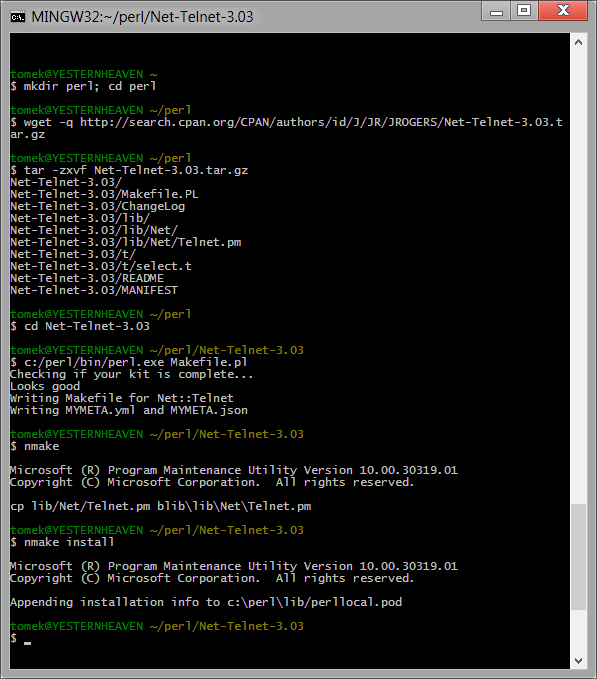
Whole operation should look like this:
</html>

