<?xml version="1.0" encoding="utf-8" ?>
<html xmlns="
http://www.w3.org/1999/xhtml" xml:lang="en" lang="en">
<head>
<style type="text/css">
/*
:Author: David Goodger (
goodger@python.org)
:Id: $Id: html4css1.css 8954 2022-01-20 10:10:25Z milde $
:Copyright: This stylesheet has been placed in the public domain.
Default cascading style sheet for the HTML output of Docutils.
See
https://docutils.sourceforge.io/docs/howto/html-stylesheets.html for how to
customize this style sheet.
*/
/* used to remove borders from tables and images */
.borderless, table.borderless td, table.borderless th {
border: 0 }
table.borderless td, table.borderless th {
/* Override padding for "table.docutils td" with "! important".
The right padding separates the table cells. */
padding: 0 0.5em 0 0 ! important }
.first {
/* Override more specific margin styles with "! important". */
margin-top: 0 ! important }
.last, .with-subtitle {
margin-bottom: 0 ! important }
.hidden {
display: none }
.subscript {
vertical-align: sub;
font-size: smaller }
.superscript {
vertical-align: super;
font-size: smaller }
a.toc-backref {
text-decoration: none ;
color: black }
blockquote.epigraph {
margin: 2em 5em ; }
dl.docutils dd {
margin-bottom: 0.5em }
object[type="image/svg+xml"], object[type="application/x-shockwave-flash"] {
overflow: hidden;
}
/* Uncomment (and remove this text!) to get bold-faced definition list terms
dl.docutils dt {
font-weight: bold }
*/
div.abstract {
margin: 2em 5em }
div.abstract p.topic-title {
font-weight: bold ;
text-align: center }
div.admonition, div.attention, div.caution, div.danger, div.error,
div.hint, div.important, div.note, div.tip, div.warning {
margin: 2em ;
border: medium outset ;
padding: 1em }
div.admonition p.admonition-title, div.hint p.admonition-title,
div.important p.admonition-title, div.note p.admonition-title,
div.tip p.admonition-title {
font-weight: bold ;
font-family: sans-serif }
div.attention p.admonition-title, div.caution p.admonition-title,
div.danger p.admonition-title, div.error p.admonition-title,
div.warning p.admonition-title, .code .error {
color: red ;
font-weight: bold ;
font-family: sans-serif }
/* Uncomment (and remove this text!) to get reduced vertical space in
compound paragraphs.
div.compound .compound-first, div.compound .compound-middle {
margin-bottom: 0.5em }
div.compound .compound-last, div.compound .compound-middle {
margin-top: 0.5em }
*/
div.dedication {
margin: 2em 5em ;
text-align: center ;
font-style: italic }
div.dedication p.topic-title {
font-weight: bold ;
font-style: normal }
div.figure {
margin-left: 2em ;
margin-right: 2em }
div.footer, div.header {
clear: both;
font-size: smaller }
div.line-block {
display: block ;
margin-top: 1em ;
margin-bottom: 1em }
div.line-block div.line-block {
margin-top: 0 ;
margin-bottom: 0 ;
margin-left: 1.5em }
div.sidebar {
margin: 0 0 0.5em 1em ;
border: medium outset ;
padding: 1em ;
background-color: #ffffee ;
width: 40% ;
float: right ;
clear: right }
div.sidebar p.rubric {
font-family: sans-serif ;
font-size: medium }
div.system-messages {
margin: 5em }
div.system-messages h1 {
color: red }
div.system-message {
border: medium outset ;
padding: 1em }
div.system-message p.system-message-title {
color: red ;
font-weight: bold }
div.topic {
margin: 2em }
h1.section-subtitle, h2.section-subtitle, h3.section-subtitle,
h4.section-subtitle, h5.section-subtitle, h6.section-subtitle {
margin-top: 0.4em }
h1.title {
text-align: center }
h2.subtitle {
text-align: center }
hr.docutils {
width: 75% }
img.align-left, .figure.align-left, object.align-left, table.align-left {
clear: left ;
float: left ;
margin-right: 1em }
img.align-right, .figure.align-right, object.align-right, table.align-right {
clear: right ;
float: right ;
margin-left: 1em }
img.align-center, .figure.align-center, object.align-center {
display: block;
margin-left: auto;
margin-right: auto;
}
table.align-center {
margin-left: auto;
margin-right: auto;
}
.align-left {
text-align: left }
.align-center {
clear: both ;
text-align: center }
.align-right {
text-align: right }
/* reset inner alignment in figures */
div.align-right {
text-align: inherit }
/* div.align-center * { */
/* text-align: left } */
.align-top {
vertical-align: top }
.align-middle {
vertical-align: middle }
.align-bottom {
vertical-align: bottom }
ol.simple, ul.simple {
margin-bottom: 1em }
ol.arabic {
list-style: decimal }
ol.loweralpha {
list-style: lower-alpha }
ol.upperalpha {
list-style: upper-alpha }
ol.lowerroman {
list-style: lower-roman }
ol.upperroman {
list-style: upper-roman }
p.attribution {
text-align: right ;
margin-left: 50% }
p.caption {
font-style: italic }
p.credits {
font-style: italic ;
font-size: smaller }
p.label {
white-space: nowrap }
p.rubric {
font-weight: bold ;
font-size: larger ;
color: maroon ;
text-align: center }
p.sidebar-title {
font-family: sans-serif ;
font-weight: bold ;
font-size: larger }
p.sidebar-subtitle {
font-family: sans-serif ;
font-weight: bold }
p.topic-title {
font-weight: bold }
pre.address {
margin-bottom: 0 ;
margin-top: 0 ;
font: inherit }
pre.literal-block, pre.doctest-block, pre.math, pre.code {
margin-left: 2em ;
margin-right: 2em }
pre.code .ln { color: grey; } /* line numbers */
pre.code, code { background-color: #eeeeee }
pre.code .comment, code .comment { color: #5C6576 }
pre.code .keyword, code .keyword { color: #3B0D06; font-weight: bold }
pre.code .literal.string, code .literal.string { color: #0C5404 }
pre.code .name.builtin, code .name.builtin { color: #352B84 }
pre.code .deleted, code .deleted { background-color: #DEB0A1}
pre.code .inserted, code .inserted { background-color: #A3D289}
span.classifier {
font-family: sans-serif ;
font-style: oblique }
span.classifier-delimiter {
font-family: sans-serif ;
font-weight: bold }
span.interpreted {
font-family: sans-serif }
span.option {
white-space: nowrap }
span.pre {
white-space: pre }
span.problematic {
color: red }
span.section-subtitle {
/* font-size relative to parent (h1..h6 element) */
font-size: 80% }
table.citation {
border-left: solid 1px gray;
margin-left: 1px }
table.docinfo {
margin: 2em 4em }
table.docutils {
margin-top: 0.5em ;
margin-bottom: 0.5em }
table.footnote {
border-left: solid 1px black;
margin-left: 1px }
table.docutils td, table.docutils th,
table.docinfo td, table.docinfo th {
padding-left: 0.5em ;
padding-right: 0.5em ;
vertical-align: top }
table.docutils th.field-name, table.docinfo th.docinfo-name {
font-weight: bold ;
text-align: left ;
white-space: nowrap ;
padding-left: 0 }
/* "booktabs" style (no vertical lines) */
table.docutils.booktabs {
border: 0px;
border-top: 2px solid;
border-bottom: 2px solid;
border-collapse: collapse;
}
table.docutils.booktabs * {
border: 0px;
}
table.docutils.booktabs th {
border-bottom: thin solid;
text-align: left;
}
h1 tt.docutils, h2 tt.docutils, h3 tt.docutils,
h4 tt.docutils, h5 tt.docutils, h6 tt.docutils {
font-size: 100% }
ul.auto-toc {
list-style-type: none }
</style>
</head>
Getting Started
Quick Start
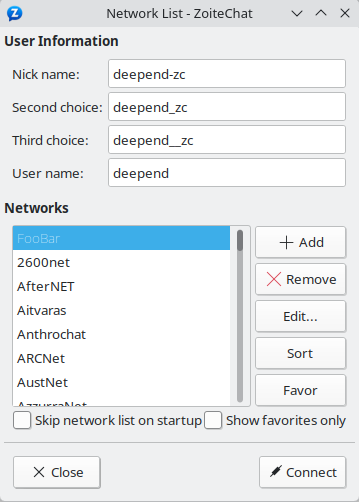
The first time you start ZoiteChat you'll see the Network List as seen
below:

Here you can specify your global logon details. The Nick name will be
your name visible in IRC channels (or second/third choice if it's
already taken), and the User name is how you identify yourself to the
server.
You can pick a server from the default list, or if it's not there, you
can add your own by clicking the Add button:
After you named it, click Edit... and specify the details of your
connection. You need at least the following information to join to a
certain group of people:
- server address
- server port
- channel name
You can see an example below:

In this example, the server address is irc.foo.bar and the port
is 6667. The channel of choice is #lobby. Favorite channels are
joined to automatically upon connecting to the network. After you
finished editing, click Close to return to the Network List.
Now select the network you want to connect to and click Connect. After
a successful connection you'll see the following window:
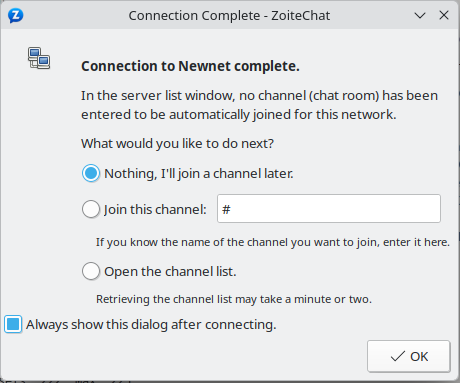
If you don't want to join a channel just yet, leave it as it is. If you
know the channel name already, specify it with the second option. In
case you want to browse through the channel list, select the third
option. Then press OK to close this window.
After you successfully joined a channel, you should see something like
this:
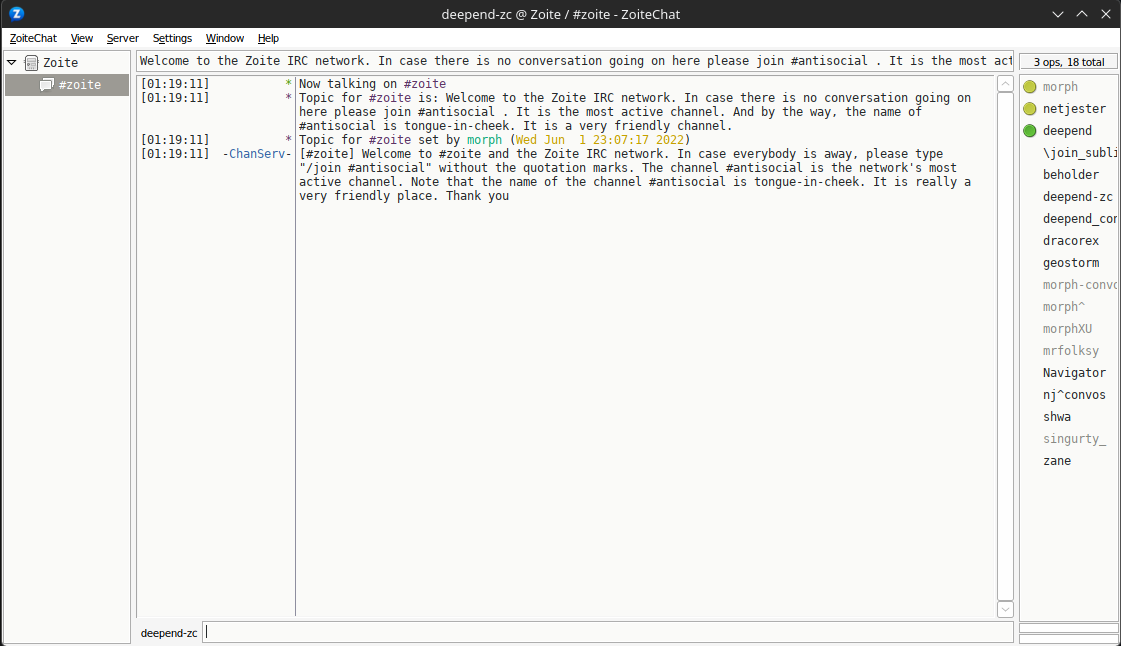
That's it, you're online. Now you can learn more about ZoiteChat and
customize it for your needs. This website is a good starting point, but
you can find a lot more on the net. Have fun!
Frequently Asked Questions
System Message: ERROR/3 (<stdin>, line 58)
Unknown directive type "toctree".
.. toctree::
    :maxdepth: 2

    faq
Changelog
System Message: ERROR/3 (<stdin>, line 66)
Unknown directive type "toctree".
.. toctree::
    :maxdepth: 2

    changelog
</html>


