mirror of
https://github.com/tildeclub/site.git
synced 2026-08-25 19:59:24 +00:00
 360337a188
It is unnecessary to have this two separate files.  Merge them into
one.  This way all information is delivered with just one click.
Also, the wiki gets even less clutter (there is few, or no, clutter in
~club wiki).

Also make small changes to edit-index.html file.

Signed-off-by: keyboardan <keyboardan@tilde.club>
47 lines
1.3 KiB
Markdown
47 lines
1.3 KiB
Markdown
---
|
|
title: Editing your index.html file
|
|
author:
|
|
- vielmetti
|
|
- keyboardan
|
|
category: tutorials
|
|
---
|
|
|
|
## How to find your index.html
|
|
|
|
There are some basic command line commands you'll want to Google and learn, but for this tutorial you only need a few:
|
|
|
|
### Basic commands
|
|
|
|
`ls` = list files and folders in current directory
|
|
|
|
`cd` = change directories
|
|
|
|
`vim`, `emacs`, `nano` = a text editor
|
|
|
|
### Put those commands into practice
|
|
|
|
Type: `ls` to list your current directory; you should see a directory listed as "public_html"
|
|
|
|
Type: `cd public_html` to change into the "public_html" directory
|
|
|
|
Type: `ls` to list the current directory again; you should see your index.html file
|
|
|
|
|
|
## How to edit index.html with a simple text editor
|
|
|
|
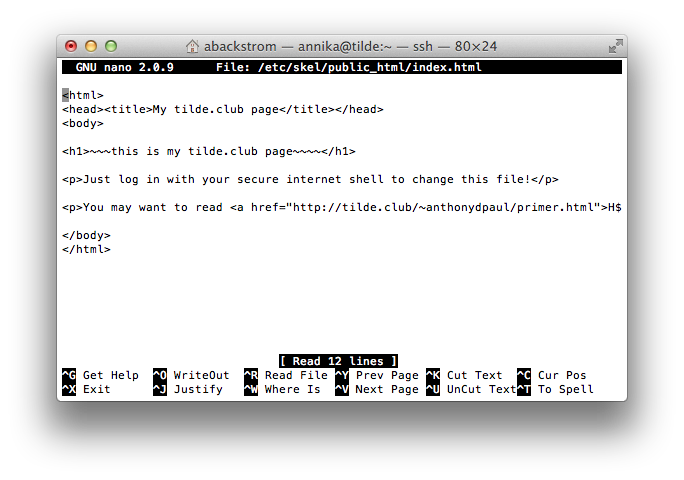
Type: `nano index.html` to open your index.html file and begin editing
|
|
|
|
|
|
|
|
Edit your file, willy nilly
|
|
|
|
When done editing, use `CTRL+X` to close the file
|
|
|
|
You'll be asked if you want to save; say y and [return] to return to the command line
|
|
|
|
Refresh your tilde page in your browser to see your new website
|
|
|
|
Note: If at any time you feel you made a mistake in editing, you can exit and n to not save
|
|
|
|
There's more info here about the nano editor; if you're familiar with emacs or vim they are here too
|