[GNU Emacs](https://www.gnu.org/software/emacs/) is a text-editor that is very capable, but also can be confusing to new users, so here's a basic guide of working with GNU Emacs.
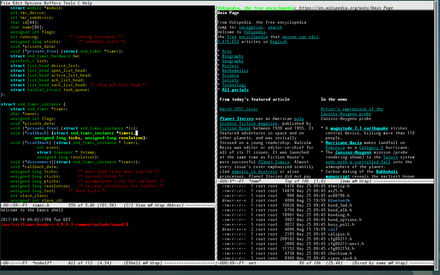
Unlike what Microsoft Windows and other common-place OS' consider "windows", a window in GNU Emacs is more like a window "pane", as where a buffer contains content, a *window* contains a buffer.
> "In Emacs terminology, a "window" is a container in which a buffer is displayed. This may be confusing at first; if so, think "pane" whenever you see "window" in an Emacs context until you get used to it."
The Modeline is the strip of details towards the bottom in an instance of GNU Emacs. This shows the file/buffer name, file type, any active modes/extensions, line and column numbers, and more.
The Minibuffer is the small area under the Modeline. It acts as a prompt, telling you when you've hit the beginning/ending of a buffer, allowing you to type interactive commands, alerting with message, allowing you to insert input, and more.
The Menu Bar is the series of drop-down menus at the top of an GNU Emacs instance. It gives all the available commands in the current buffer, and shows their corresponding keybindings.
GNU Emacs has some weird, wild command invocations, that may not make sense to new users. While this tutorial is also showing you how to use the drop-down menus, it's still good to know how to read command's keybindings, as using them is the more effective/productive route.
* While not common on modern hardware, the Meta key can be typed by either using, or by pressing-and-holding the Alt key, or by pressing-and-release the Escape/ESC key in some cases
Keybindings in GNU Emacs are typically longer than keybindings used outside of GNU Emacs, usually being a combination of what would be two "normal" keybindings. For example; to exit GNU Emacs, you can type `C-x C-c`. That means you press both of these keybindings in series to complete the GNU Emacs functionality of exiting GNU Emacs. It may sound weird, but is easy to adjust to after using it for a while.
The best way to begin learning, is the interactive way. GNU Emacs has a built-in command that is specifically to learning the basic of GNU Emacs. To access it, you can press `C-h t`, or execute the GNU Emacs command named `help-with-tutorial` (pressing `M-x help-with-tutorial`).
To close the tutorial, use `C-x k` to kill the buffer.
The way you access the drop-downs are by pressing the `F10` key, then using the arrow keys to navigate through the menus. You can press the `F10` key again to exit the menus, or the global "quit" command, `C-g`. As easy as these menus are, I recommend learning the commands by name, or slowly learning the keybindings as they make it faster and easier to navigate through GNU Emacs as a whole.
When you start GNU Emacs using `emacs` in the shell, you'll be greeted with a welcome screen, along with two other buffers titled `*scratch*` and `Messages`.
To visit a new or existing file, simply go to the File menu and select "Visit New File". You may also select "Open file...", however this does the same thing as "Visit New File", just without the ability to create a new file.
To save the current buffer, select "Save" from the File menu. If you need to save the buffer as something else, you can select "Save As", which is also in the File menu.
Whenever you are finished working on a file, and no longer need the buffer (in which the file is represented in), you can kill the current buffer by selecting "Close" from the File menu.
GNU Emacs is a very big program, and to master it, it takes a lot of time. GNU Emacs is a Lisp environment, where you can *grow* a lot. Which makes learning GNU Emacs, a great investment of time; because you can do basically everything, related to text, and for a GNU Emacs user, the sky may be the limit :D . Which means you will be able to do anything (mostly related to text) with GNU Emacs.
But you don't need to know everything that GNU Emacs has to offer (is there anyone that does know?).... The most important thing to know, is how to seek for help. And GNU Emacs is there to help you.
To access the main help menu of GNU Emacs, you press `C-h C-h`. This will open a new buffer, where you can interact. In this buffer, there is, for example, " b Show all keybindings" entry. This means that if you now press "b" it will show all the keybindings of your buffer.
And, if you are in any other buffer, and want to know all the keybindings quickly, you may press `C-h b` instead (mind that this "b", after the `C-h`, has the same effect as pressing "b" in the `C-h C-h` main menu help). `C-h` in GNU Emacs, means exactly, I want help. Then follow it with a keystroke that say the type of help you want.


